The creation of my companion app was made on figma and I followed the plan which I had made before with only a few minor changes to make the experience better.
To start with, I decided to start by making all the 3D model assets which I would need because I knew this would take the majority of my time. I made these all on Maya and textured 3 different versions of each model to include with the DLC’s which I’d be adding. I felt this was more fitting for my app instead of 2D designs because the user wants to know what they are getting.
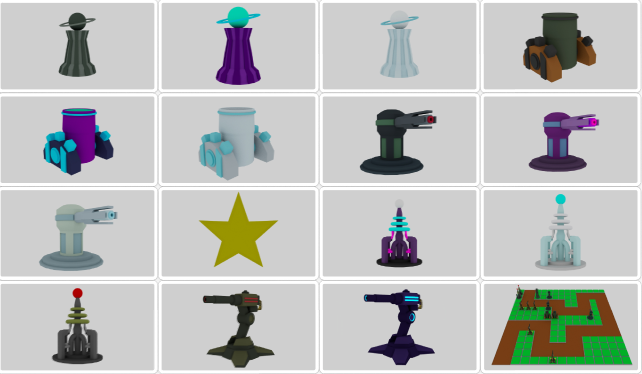
After successfully making all the assets which I needed, I started with making the home screen and then duplication that home screen 11 times for all my pages. Each page has a Hamburger menu icon that when you click it, a sidebar appears. I made the sidebar appear, then realised it wasn’t visually appealing to look at when it appeared, so I changed it to move in using the animate option.
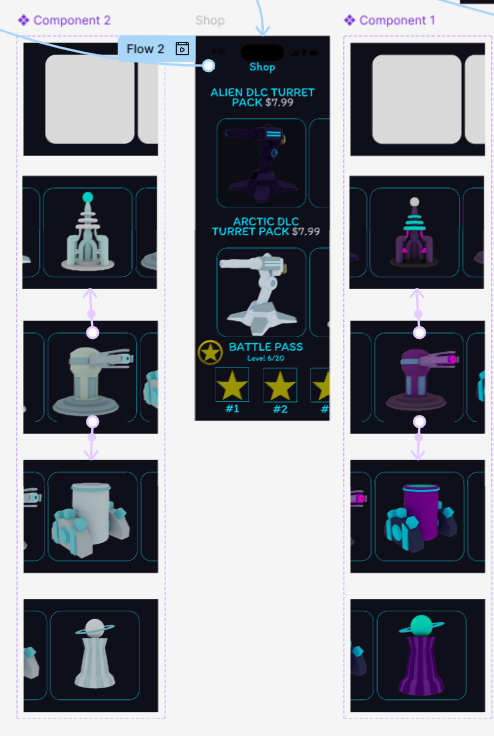
For the shop and creations of the carousels, I decided to do some research on how to make them and used this video (Academy, 2023) to help me understand. I wanted a smart animation for this so it is visually appealing, and I did this by switching the screens whenever the user scrolled. Finally, for the battlepass I used the standard ‘Scroll with parent horizontally’. I did come into a few issues with the carousels, by whenever you switched to another item it used to reset the screen, but I fixed this by framing different parts and rearranging the orders of the layers and also fixing them to the background when scrolling.
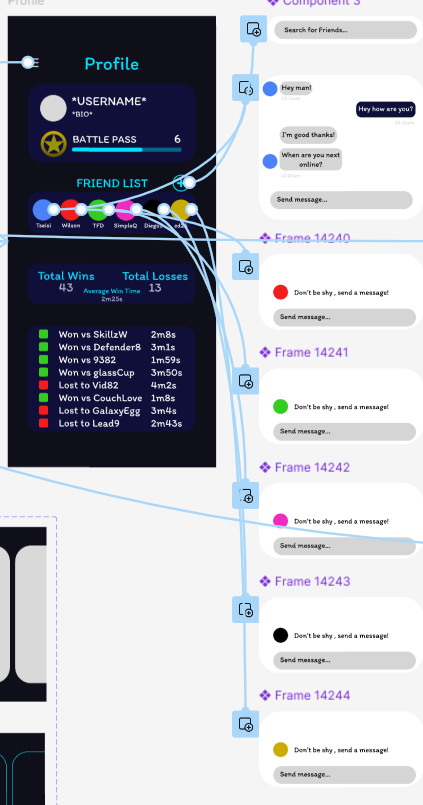
I also added a few buttons which you can click on, and a screen appears. This is included in the profile and the newsletters. I did this so the screen didn’t look as cluttered, and also it wasn’t necessary to have it showing on the main page.
For all of the icons which I used, I created them all in figma by using the shapes tools seeing as it had to be all original material.

References:
Academy, F. (2023) Figma carousel animation in 5 minutes, YouTube. Available at: https://www.youtube.com/watch?v=4YFRYho3vuM (Accessed: 05 May 2025).